
Document Processing
Extract structured fields from invoices, receipts, insurance forms, and handwritten documents using Datature Vi and JSON output.
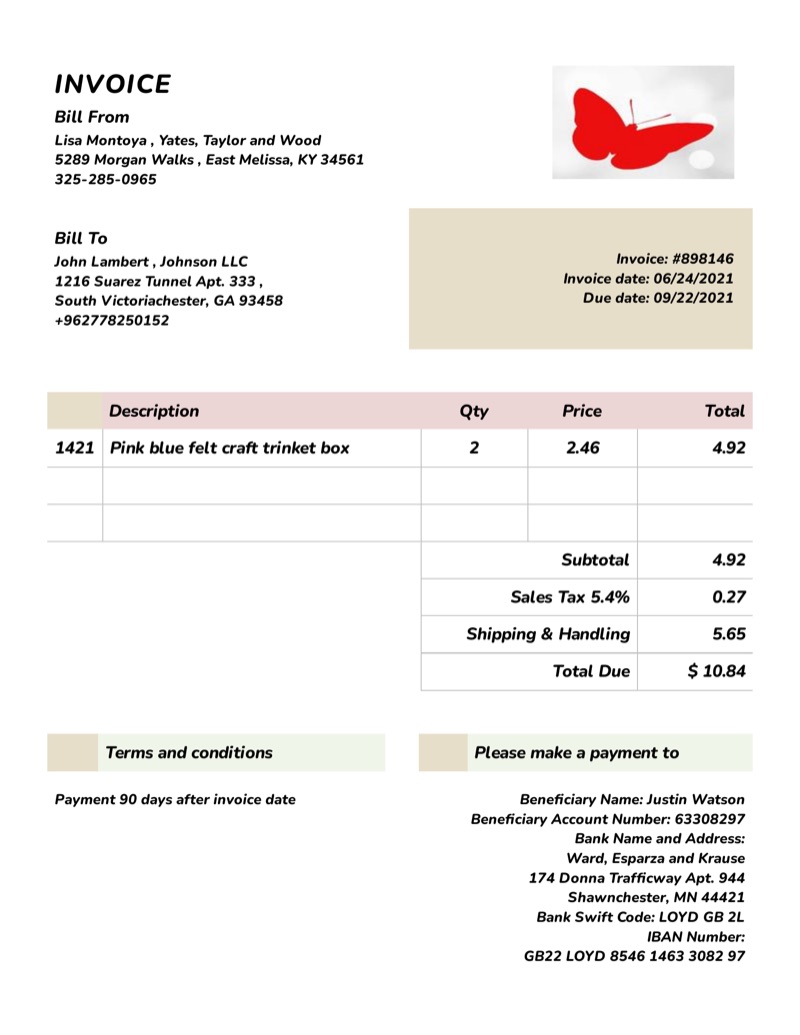
Every business handles paperwork: invoices, receipts, insurance claims, shipping documents. Someone has to read each one and type the important fields into a system. That process is slow, repetitive, and prone to typos.
Datature Vi trains an AI model to read your documents and pull out the fields you care about. You show the model examples of your documents with the correct answers, and it learns to extract those same fields from new documents on its own. It works even when layouts change between suppliers or when handwriting is hard to read.
Unlike traditional OCR tools that only read raw text, a Datature Vi model understands the structure of your documents. It knows that the number next to "Total" is a dollar amount, not a date.
For an interactive overview of this application, visit the document extraction use case on vi.datature.com.
Common applications
How document extraction works
Document extraction uses the freeform text dataset type with:
- JSON annotations: each training image is annotated with the structured fields extracted from it
- A system prompt that specifies the schema and instructs the model to output only JSON
At inference, the model returns a JSON string you parse with json.loads(). See Structured Data Extraction for the full setup guide.
Invoice extraction
Schema design
{
  "vendor": "Acme Supply Co.",
  "invoice_number": "INV-2024-00142",
  "invoice_date": "2024-03-15",
  "due_date": "2024-04-15",
  "subtotal": "850.00",
  "tax": "68.00",
  "total": "918.00",
  "currency": "USD",
  "line_items": [
    {"description": "Industrial Widget A", "quantity": 10, "unit_price": "50.00", "line_total": "500.00"},
    {"description": "Mounting Bracket B", "quantity": 5, "unit_price": "70.00", "line_total": "350.00"}
  ]
}
System prompt
You are an invoice extraction assistant. Extract the following fields from the invoice image and return a JSON object:
- vendor (string): company name of the seller
- invoice_number (string): invoice or reference number
- invoice_date (string): invoice date in YYYY-MM-DD format
- due_date (string or null): payment due date in YYYY-MM-DD format, null if not shown
- subtotal (string): amount before tax
- tax (string or null): tax amount, null if not shown
- total (string): total amount due
- currency (string): 3-letter currency code (USD, EUR, GBP, etc.)
- line_items (array): list of items, each with description, quantity, unit_price, line_total

Use null for any field not present in the document. Respond with only the JSON object.
Vi SDK code
import json
from vi.inference import ViModel

model = ViModel(
    run_id="your-run-id",
    secret_key=".your-secret-key.",
    organization_id="your-organization-id",
)

result, error = model(
    source="invoice_scan.jpg",
    user_prompt="Extract all invoice fields from this document.",
    generation_config={"temperature": 0.0, "do_sample": False}
)

if error is None:
    invoice = json.loads(result.result)
    print(f"Vendor: {invoice['vendor']}")
    print(f"Total: {invoice['currency']} {invoice['total']}")
    print(f"Line items: {len(invoice['line_items'])}")
Receipt parsing
Schema design
{
  "merchant": "Corner Café",
  "date": "2024-03-15",
  "time": "09:42",
  "items": [
    {"name": "Cappuccino", "quantity": 2, "price": "4.50"},
    {"name": "Croissant", "quantity": 1, "price": "3.25"}
  ],
  "subtotal": "12.25",
  "tax": "0.98",
  "total": "13.23",
  "payment_method": "card"
}
Tips for receipt training data:
- Include receipts from multiple merchant formats, as layout varies between merchants
- Include both printed and handwritten receipts if your use case involves both
- Include partially obscured or low-contrast receipts if those appear in production
Insurance claim forms
Schema design
{
  "policy_number": "POL-885-2024",
  "claimant_name": "Jane Smith",
  "incident_date": "2024-02-28",
  "incident_type": "vehicle damage",
  "damage_description": "Rear bumper dent and broken tail light from parking lot collision",
  "estimated_repair_cost": "1200.00",
  "form_complete": true
}
Handling handwritten fields
Handwritten text is harder for VLMs than printed text. To improve accuracy:
- Include training examples across different handwriting styles
- For critical fields (policy number, date), add a VQA follow-up to verify: "What is the policy number written on this form?"
- Use
temperature: 0.0for deterministic output
Batch document processing
For processing many documents in a pipeline:
import json
import os
from vi.inference import ViModel

model = ViModel(
    run_id="your-run-id",
    secret_key=".your-secret-key.",
    organization_id="your-organization-id",
)

invoice_dir = "./invoices"
image_paths = [
    os.path.join(invoice_dir, f)
    for f in os.listdir(invoice_dir)
    if f.endswith((".jpg", ".png"))
]

results = model(
    source=image_paths,
    user_prompt="Extract all invoice fields from this document.",
    generation_config={"temperature": 0.0, "do_sample": False}
)

extracted = []
failed = []

for path, (result, error) in zip(image_paths, results):
    if error is not None:
        failed.append({"file": path, "error": str(error)})
        continue
    try:
        data = json.loads(result.result)
        data["source_file"] = path
        extracted.append(data)
    except json.JSONDecodeError:
        failed.append({"file": path, "error": "malformed JSON", "raw": result.result})

print(f"Extracted: {len(extracted)} | Failed: {len(failed)}")
Training tips for document processing
Vary your training documents: train on documents from multiple suppliers or layouts. A model trained only on one invoice format will fail on others.
Use consistent null handling: decide upfront what to output when a field is absent (null, "", or omit the key entirely) and be consistent across all annotations.
Date format standardization: instruct the model in your system prompt to always output dates as YYYY-MM-DD, even if the document shows March 15, 2024 or 15/03/24.
Test on real production documents: scan quality, lighting, and document age affect accuracy. Test with the same image quality you'll see in production.
Validate critical fields: for high-stakes fields (totals, policy numbers), consider a secondary VQA pass to verify the extracted value before writing to your system.
Next steps
Updated 6 months ago