Configure Your Dataset

Set up dataset splitting, shuffling, and filtering for optimal training performance.

Configure your dataset

Dataset configuration determines how your training data is split and organized for model training. Proper dataset configuration ensures your VLM learns effectively from your data while accurately measuring performance on unseen examples.

💡

Looking for a quick start?

For streamlined workflow setup without detailed dataset configuration:

📋

Prerequisites

Before configuring your dataset, ensure you have:

Understanding dataset configuration

When you create a workflow, you configure how your dataset is used during training. This includes:

  • Dataset source selection — Which dataset to use for training
  • Train-test split ratio — How to divide data between training and evaluation
  • Shuffle settings — Whether to randomize data order
  • Data filtering — Selecting specific subsets or classes (advanced)

These settings directly impact:

  • Model learning — How effectively your VLM learns from examples
  • Performance evaluation — How accurately you measure model quality
  • Training efficiency — How quickly training converges
  • Generalization — How well the model performs on new data

Dataset configuration options

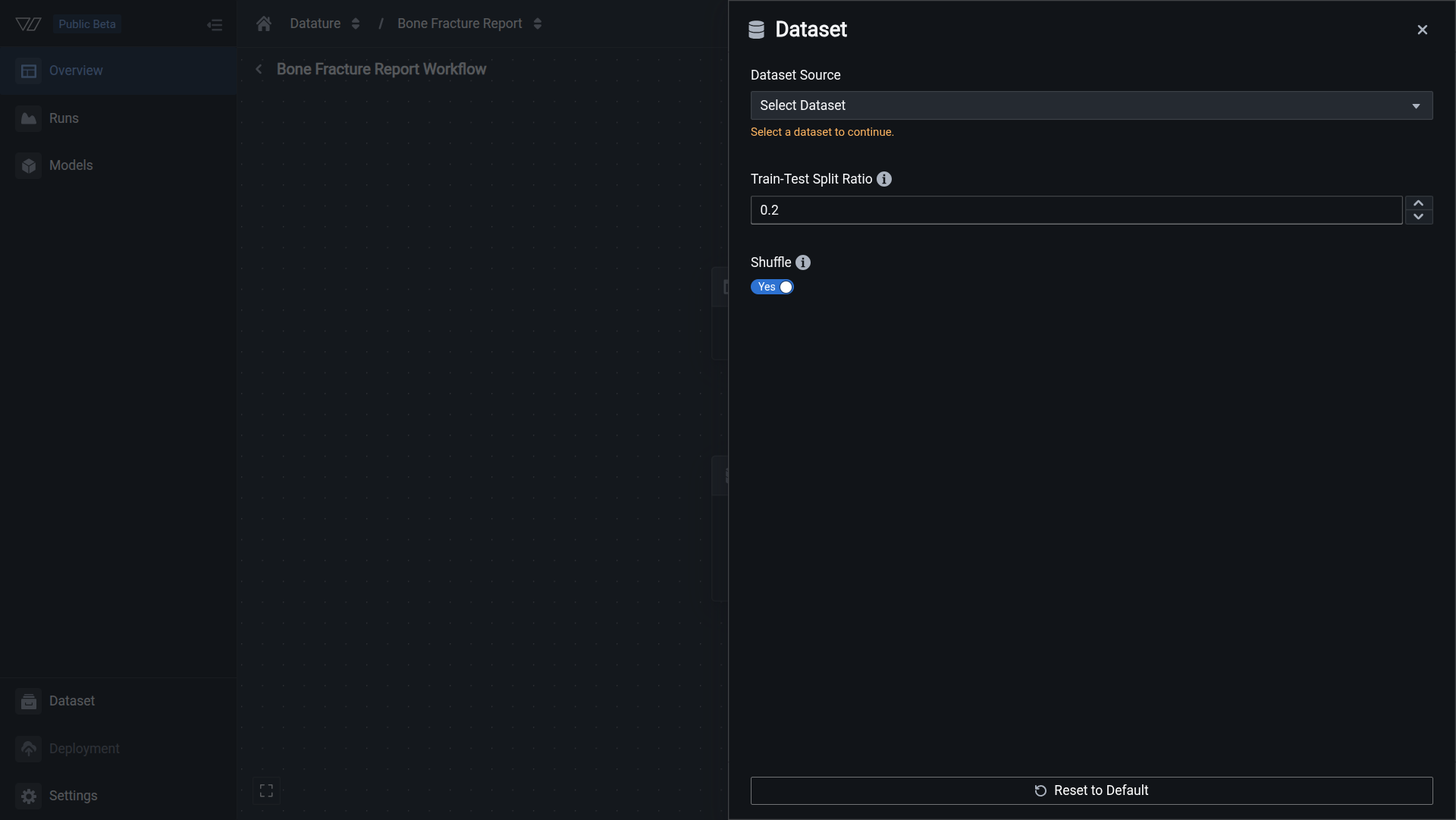
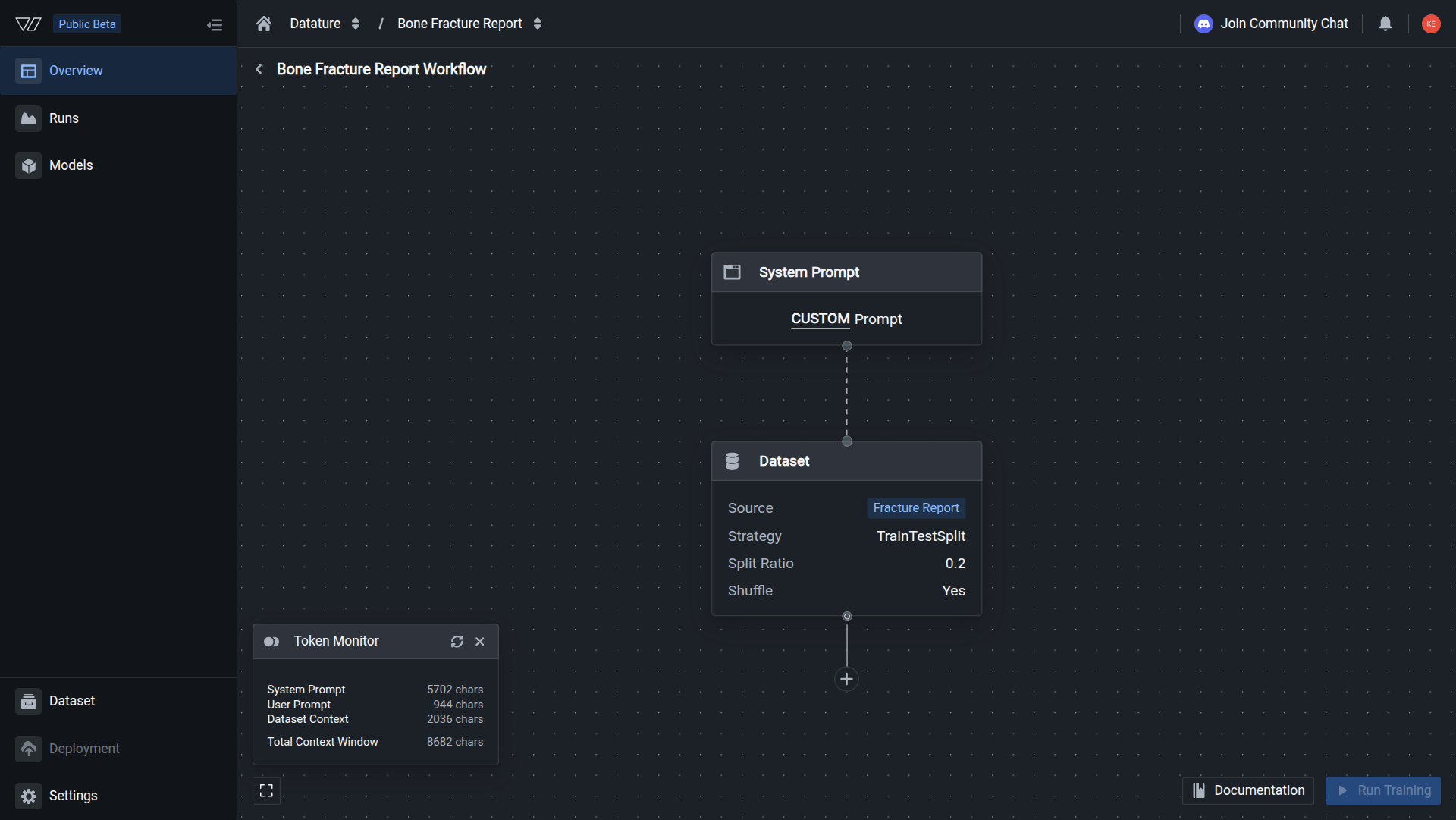
Access dataset configuration by clicking the Dataset node in the workflow canvas.

Dataset source

Select which dataset to use for training from your available datasets.

Options:

  • Any dataset in your organization with annotations
  • Datasets must contain images and annotations compatible with your system prompt task type

Considerations:

  • Choose datasets appropriate for your task (phrase grounding or VQA)
  • Ensure sufficient annotations (minimum 20 images recommended, 100+ for production)
  • Verify annotation quality and consistency before training

Learn how to create datasets →


Train-test split ratio

The train-test split ratio determines how your dataset is divided between training and evaluation.

What is train-test split?

During training, your dataset is divided into two subsets:

  • Training set — Data used to train the model (learn patterns)
  • Test set — Data held back to evaluate model performance (measure quality)

The split ratio represents the proportion allocated to the test set. For example:

Split RatioTraining DataTest DataExample (100 images)
0.190%10%90 train, 10 test
0.280%20%80 train, 20 test
0.370%30%70 train, 30 test
📘

How the ratio works

If you set the split ratio to 0.2 (20%):

  • 80% of your data will be used for training
  • 20% of your data will be held back for evaluation

The test set is never seen during training, ensuring unbiased performance measurement.

Choosing the right split ratio

Recommended split ratios:

Small datasets (20-200 images)

Recommended: 0.1-0.2 (10-20% test)

For small datasets, maximize training data while maintaining enough test examples for evaluation.

Example with 50 images:

  • Split ratio 0.2 = 40 training, 10 test
  • Split ratio 0.1 = 45 training, 5 test

Best practice: Use at least 10 test images when possible. If your dataset is smaller than 50 images, consider collecting more data before training.

Medium datasets (200-1000 images)

Recommended: 0.2 (20% test)

The standard 80/20 split provides good balance for most use cases.

Example with 500 images:

  • Split ratio 0.2 = 400 training, 100 test
  • Sufficient training data for learning
  • Adequate test set for reliable evaluation

Best practice: The 0.2 ratio is the default and works well for most production applications.

Large datasets (1000+ images)

Recommended: 0.15-0.3 (15-30% test)

Large datasets offer flexibility in split ratios.

Example with 2000 images:

  • Split ratio 0.2 = 1600 training, 400 test
  • Split ratio 0.3 = 1400 training, 600 test

Best practice: Larger test sets (20-30%) provide more reliable performance metrics. You have enough training data even with higher test ratios.

Setting the split ratio

  1. Click the Dataset node in your workflow
  2. Locate the Train-Test Split Ratio field
  3. Enter a value between 0.0 and 1.0:
    • 0.1 = 10% test, 90% training
    • 0.2 = 20% test, 80% training (recommended default)
    • 0.3 = 30% test, 70% training
❗️

Important: Test data is never used for training

Data in the test set is completely held out during training. The model never sees these examples during learning, ensuring evaluation metrics accurately reflect performance on new, unseen data.


Shuffle

Shuffle randomizes the order of your data before splitting it into training and test sets. This is a critical setting that impacts model performance and evaluation reliability.

What does shuffle do?

When enabled:

  • Data is randomly reordered before train-test splitting
  • Each training run uses a different random split
  • Prevents biases from data collection order
  • Improves model generalization

When disabled:

  • Data maintains its original order
  • Train-test split is deterministic (same every time)
  • May introduce biases if data has sequential patterns
  • Useful for debugging or reproducibility

Recommendation: Enable shuffle

Shuffle should be enabled (Yes) for almost all training scenarios. It's a best practice that prevents overfitting to data collection patterns and ensures more robust model evaluation.

Why shuffle is important

Prevents sequential biases:

If your dataset contains sequential patterns (e.g., collected over time, organized by category), shuffle prevents the model from learning these artificial patterns.

Example without shuffle:

Original data order:
- Images 1-50: Outdoor scenes (daytime)
- Images 51-100: Indoor scenes (nighttime)

With split ratio 0.2 (no shuffle):
- Training: Images 1-80 (mostly outdoor + some indoor)
- Test: Images 81-100 (all indoor nighttime)

Problem: Test set doesn't represent full data distribution

Example with shuffle:

After shuffling:
- Images mixed randomly

With split ratio 0.2 (shuffled):
- Training: Random mix of outdoor/indoor
- Test: Random mix of outdoor/indoor

Benefit: Test set accurately represents overall distribution

Improves generalization:

Random data ordering helps the model learn robust features rather than memorizing sequence-dependent patterns.

Setting shuffle

  1. Click the Dataset node in your workflow
  2. Locate the Shuffle toggle
  3. Set to Yes (recommended) or No

When to enable shuffle (Yes):

  • Standard training workflows (recommended for 99% of cases)
  • Production models requiring robust generalization
  • Datasets with any sequential organization
  • When test set should represent full data distribution

When to disable shuffle (No):

  • Debugging specific training issues
  • Reproducing exact results from previous runs
  • Research experiments requiring deterministic splits
  • Temporal data where chronological order matters
💡

Shuffle vs. reproducibility

Even with shuffle enabled, you can achieve reproducibility by setting a random seed in advanced training settings. This allows random shuffling while maintaining consistent splits across runs for comparison.


Best practices

Match test set to real-world distribution

Your test set should reflect the data distribution your model will encounter in production.

Good practices:

  • Enable shuffle to ensure representative sampling
  • Include all classes/scenarios in proper proportions
  • Avoid artificially balanced test sets if production data is imbalanced
  • Test on edge cases and challenging examples

Example: If production data is 80% good parts and 20% defective parts, your test set should maintain this ratio rather than artificially balancing to 50/50.

Maintain sufficient test set size

Small test sets produce unreliable performance metrics.

Minimum recommendations:

  • Absolute minimum: 10 test images
  • Reasonable minimum: 20-30 test images
  • Recommended: 50+ test images
  • Ideal: 100+ test images

Why this matters: With only 5 test images, a single misprediction changes accuracy by 20%. With 100 test images, a single error changes accuracy by only 1%.

Consider dataset size when splitting

Adjust your split ratio based on total dataset size:

Small datasets (< 100 images):

  • Use smaller test ratios (0.1-0.15) to maximize training data
  • Consider data augmentation to expand effective dataset size
  • Collect more data if possible before training

Medium datasets (100-1000 images):

  • Standard 0.2 split ratio works well
  • Balanced between training data and evaluation reliability

Large datasets (> 1000 images):

  • Can afford larger test ratios (0.2-0.3)
  • More reliable performance metrics
  • Consider creating separate validation sets for hyperparameter tuning
Always enable shuffle

Unless you have a specific reason not to, enable shuffle:

Benefits:

  • Prevents temporal biases
  • Ensures representative test sets
  • Improves generalization
  • Reduces overfitting to collection order

Rare exceptions:

  • Time-series data requiring chronological order
  • Debugging reproducibility issues (use random seed instead)
  • Specific research requirements
Validate data quality before configuration

Before configuring dataset splits, ensure data quality:

Check for:

  • Annotation accuracy and consistency
  • Missing or incomplete annotations
  • Class imbalance issues
  • Duplicate images
  • Corrupted or low-quality images

Actions:


Data filtering (Advanced)

For advanced use cases, you can filter which data is used from your selected dataset.

Filtering options

By classes:

  • Select specific annotation classes to include
  • Useful for training on subset of categories
  • Reduces training time for focused tasks

By tags:

  • Filter images by custom tags
  • Organize training by scenarios or conditions
  • Enable targeted model development

By quality scores:

  • Filter based on annotation confidence
  • Include only high-quality examples
  • Improve training data cleanliness

When to use filtering

Training class-specific models

Train models focused on specific object types:

Example: From a dataset with 10 vehicle types, filter to train a model that only detects cars and trucks:

  • Select classes: "car", "truck"
  • Exclude: motorcycles, buses, bicycles, etc.
  • Result: Faster training, specialized model
Iterative model development

Start with simple cases and gradually add complexity:

Example:

  • Iteration 1: Train on clear, well-lit images only
  • Iteration 2: Add challenging lighting conditions
  • Iteration 3: Include edge cases and occlusions
  • Result: Controlled difficulty progression
Addressing class imbalance

Balance training data when some classes are overrepresented:

Example: Dataset has 1000 "good" parts and 50 "defective" parts:

  • Filter "good" parts to ~200 examples
  • Keep all "defective" parts
  • Result: More balanced training data

Note: Consider collecting more defect examples as the better solution.


Common questions

Can I change the dataset split after training?

No, the split is fixed when you start a training run. To use a different split ratio or different data, you need to:

  1. Create a new workflow with updated dataset configuration
  2. Start a new training run
  3. Compare results across runs to determine optimal settings

This is why it's important to choose appropriate settings before training.

What happens to images in the test set?

Test set images are:

  • Never used for training — The model doesn't learn from them
  • Used for evaluation — They measure model performance during and after training
  • Provide unbiased metrics — Results reflect performance on truly unseen data

After training, you can evaluate your model on the test set to see performance metrics, confusion matrices, and prediction examples.

Should I use the same split ratio for all my experiments?

For comparison purposes, yes:

When comparing different model architectures or system prompts, use the same split ratio to ensure fair comparison.

For optimization, experiment:

Try different split ratios if you're uncertain what works best for your dataset size:

  • Create workflows with 0.1, 0.2, and 0.3 splits
  • Train models with each configuration
  • Compare training performance and test metrics
  • Choose the ratio that provides best balance
My dataset is small. Should I skip the test set?

No, always maintain a test set, even for small datasets. Here's why:

Without a test set:

  • No way to measure actual model performance
  • Risk of severe overfitting without knowing
  • Can't trust training metrics alone
  • Deployment failures on real data

Better approaches:

  • Use a smaller test ratio (0.1) to maximize training data
  • Collect more data before training if possible
  • Use cross-validation techniques
  • Consider data augmentation to expand effective dataset size

Minimum recommendation: At least 10 test images, even if that means only 40-50 training images.

What if my dataset has very few examples of certain classes?

Class imbalance requires special attention:

Options:

  1. Collect more examples (best solution)

    • Gather additional data for underrepresented classes
    • Ensures model learns all classes effectively
  2. Use data filtering

    • Reduce overrepresented classes
    • Balance training distribution artificially
  3. Adjustclass weights (advanced)

    • Increase importance of rare classes during training
    • Available in advanced training settings
  4. Accept imbalance (if it matches production)

    • If real-world data is imbalanced, train on realistic distribution
    • Adjust inference thresholds instead

What to avoid:

  • Don't oversample by duplicating images (causes overfitting)
  • Don't artificially balance test set if production data is imbalanced
Does shuffle change my training results every time?

Yes, slightly:

Each time you train with shuffle enabled, the random split is different, leading to minor variations in:

  • Which specific images are in train vs. test sets
  • Training metrics and final performance
  • Model behavior on edge cases

This is normal and expected. Variations are typically small (1-3% accuracy difference).

To maintain consistency:

  • Set a random seed in advanced settings
  • Creates reproducible shuffles
  • Same random split across runs
  • Useful for controlled experiments
Can I use multiple datasets in one workflow?

Currently, workflows use a single dataset source. To train on multiple datasets:

Option 1: Merge datasets (recommended)

  1. Create a new dataset
  2. Upload or copy images from multiple sources
  3. Use the merged dataset in your workflow

Option 2: Train iteratively

  • Train initial model on Dataset A
  • Fine-tune on Dataset B using the first model as base
  • Useful for domain adaptation scenarios

Option 3: Dataset versioning

  • Create dataset versions combining different sources
  • Train on each version
  • Compare performance

Example configurations

Standard production model

Scenario: Training a quality control model with 500 annotated images

Configuration:

  • Dataset source: "PCB Defect Detection v3"
  • Train-test split ratio: 0.2 (80% train, 20% test)
  • Shuffle: Yes

Reasoning:

  • 400 training images sufficient for learning
  • 100 test images provide reliable metrics
  • Shuffle ensures representative evaluation
  • Standard setup for most production use cases
Small dataset experiment

Scenario: Initial prototype with 60 annotated images

Configuration:

  • Dataset source: "Retail Products Pilot"
  • Train-test split ratio: 0.15 (85% train, 15% test)
  • Shuffle: Yes

Reasoning:

  • 51 training images (maximize learning data)
  • 9 test images (minimum for basic evaluation)
  • Plan to collect more data based on results
  • Lower split ratio compensates for small dataset

Next steps:

  • Evaluate initial results
  • Collect 200+ more images for production model
  • Increase split ratio to 0.2 with larger dataset
Large-scale production model

Scenario: Comprehensive model with 5000 annotated images

Configuration:

  • Dataset source: "Warehouse Inventory Full"
  • Train-test split ratio: 0.25 (75% train, 25% test)
  • Shuffle: Yes

Reasoning:

  • 3750 training images (more than sufficient)
  • 1250 test images (highly reliable metrics)
  • Larger test set provides confidence in performance
  • Can afford higher test ratio with large dataset
Debugging reproducibility

Scenario: Investigating training instability, need consistent splits

Configuration:

  • Dataset source: "Debug Dataset v1"
  • Train-test split ratio: 0.2 (80% train, 20% test)
  • Shuffle: Yes
  • Advanced: Random seed = 42 (set in training settings)

Reasoning:

  • Standard split ratio
  • Shuffle enabled for best practices
  • Random seed ensures same split every run
  • Allows controlled comparison across debugging sessions

Next steps

After configuring your dataset:

Continue workflow configuration

Start training

Improve your dataset


Additional resources

Dataset management

Training guides

Concept guides

Quickstart

Related resources