Download Annotations
Export annotation data in Vi JSONL or TFRecord formats without downloading asset files.
Downloading annotations exports only your annotation data without the asset files. This includes phrase grounding annotations (captions, bounding boxes, grounded phrases), VQA annotations (question-answer pairs), and freeform annotations (coming soon). This is useful for lightweight backups, annotation analysis, format conversion, or sharing annotations without large image files.
Annotation export formats
- Vi JSONL — Datature's JSON Lines format for annotations, one record per line
- TFRecord — TensorFlow's binary format optimized for training pipelines
Both formats support phrase grounding and VQA annotations from your datasets. Freeform annotations support is coming soon.
Programmatic access with Vi SDKYou can also download annotations programmatically using the Vi SDK:
- Download annotations only — Use
client.annotations.download()convenience method- Multiple formats — Export in COCO, YOLO, Pascal VOC, or Vi formats
- Automated exports — Integrate annotation downloads into your workflows
- Parse and process — Directly load JSONL files in Python for analysis
- Format conversion — Build custom scripts to convert Vi annotations to other formats
Navigate to annotation export
-
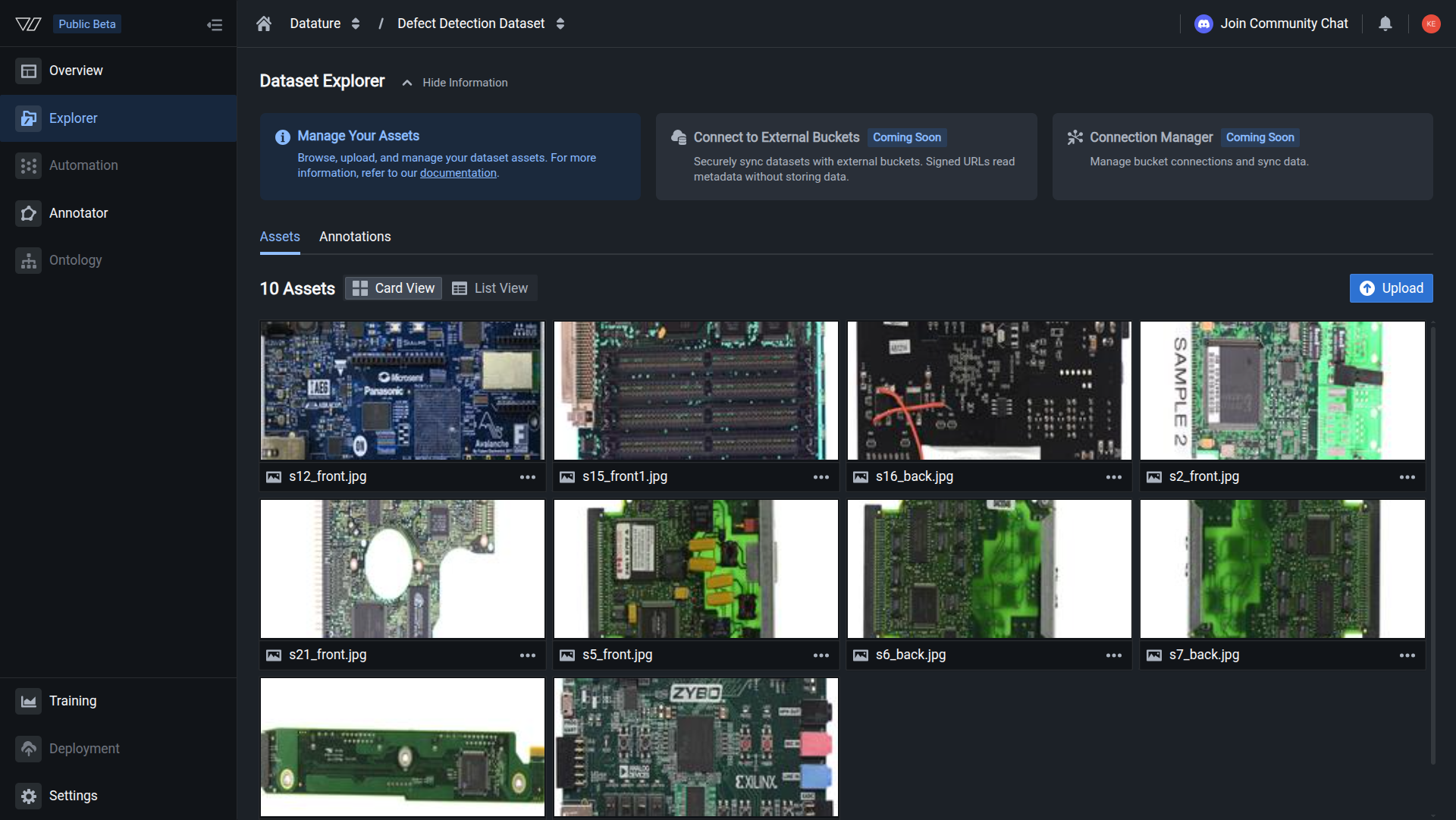
In your organization, navigate to the Explorer section from the sidebar
-
Select the dataset containing the annotations you want to download
-
Click the Annotations tab in the Dataset Explorer header
-
The Annotations page displays the Export Annotations section with an Export button
Dataset Explorer - Annotations tabAccess the Export Annotations section to download annotation data in various formats.
Export Vi JSONL annotations
Vi JSONL (JSON Lines) is Datature's native annotation format, storing each annotation record on a separate line for efficient streaming and processing.
Configure Vi JSONL export
-
Click the Export button in the Export Annotations section
-
The Annotation Export dialog opens
-
In the Export Format dropdown, select Vi JSONL
Vi JSONL export configurationConfigure export settings for Vi JSONL annotation format.
Configure export options
Test Split Ratio (Optional)
Split your annotations into training and testing subsets:
-
Check the Enabled checkbox to activate test splitting
-
Enter a decimal value between 0 and 1:
0.2— 20% test set, 80% training set0.1— 10% test set, 90% training set0.3— 30% test set, 70% training set
-
Leave unchecked to export all annotations together
Normalization
Select Normalized to organize annotations in a standardized structure:
- Normalized — Annotations structured with consistent coordinate systems and formats
- Ensures compatibility with training frameworks and processing tools
Export preview
Review the export summary before downloading:
You are about to export [N] assets with [M] annotations.Verify the count matches your expectations.
Download Vi JSONL
-
Review your configuration:
- Export Format: Vi JSONL
- Test Split Ratio: Your chosen value or disabled
- Normalization: Normalized
-
Click the Export button to start the download
-
The export processes and downloads a
.jsonlfile containing your annotations
Export TFRecord annotations
TFRecord is TensorFlow's binary format optimized for high-performance data loading in training pipelines. Learn more about TFRecord format →
Configure TFRecord export
-
Click the Export button in the Export Annotations section
-
In the Annotation Export dialog, select TFRecord from the Export Format dropdown
-
Configure the same export options:
- Test Split Ratio — Optional train/test split
- Normalization — Select Normalized for standardized output
-
Review the export preview summary
-
Click Export to download the TFRecord file
TFRecord use cases
- TensorFlow training — Native format for TensorFlow data pipelines
- Performance optimization — Binary format loads faster than JSON
- Large datasets — Efficient for datasets with thousands of annotations
- Production pipelines — Ideal for production ML workflows
Vi JSONL format specification
Vi JSONL files contain one JSON object per line, making them efficient for streaming and parallel processing.
For the complete Vi JSONL format specification including:
- Full record structure and field descriptions
- Phrase grounding annotation format with examples
- VQA annotation format with examples
- Coordinate systems and normalization details
See the complete Vi JSONL specification →
Download annotations with Vi SDK
You can download annotations programmatically using the Vi SDK, which is useful for automated workflows and batch processing.
Download annotations only (recommended)
import vi
# Initialize client
client = vi.Client(
secret_key="your-secret-key",
organization_id="your-organization-id"
)
# Download annotations using the annotations API (recommended)
result = client.annotations.download(
dataset_id="your-dataset-id",
save_dir="./annotations"
)
print(result.summary())
print(f"Downloaded to: {result.save_dir}")Alternative method:
# Download annotations using the datasets API
result = client.datasets.download(
dataset_id="your-dataset-id",
save_dir="./annotations",
annotations_only=True
)Both methods produce identical results. The client.annotations.download() method is a convenience wrapper that's more intuitive for annotation-specific downloads.
Download with custom export settings
from vi.api.resources.datasets.types import (
DatasetExportSettings,
DatasetExportFormat,
DatasetExportOptions
)
# Configure JSONL export with train/test split
settings = DatasetExportSettings(
format=DatasetExportFormat.VI_JSONL,
options=DatasetExportOptions(
normalized=True,
split_ratio=0.2 # 20% test, 80% training
)
)
# Download annotations with custom settings
result = client.annotations.download(
dataset_id="your-dataset-id",
export_settings=settings,
save_dir="./annotations",
show_progress=True
)Download in different formats
from vi.api.resources.datasets.types import DatasetExportFormat
# Download in COCO format (phrase grounding datasets only)
result = client.annotations.download(
dataset_id="your-dataset-id",
export_settings={"format": DatasetExportFormat.COCO},
save_dir="./coco_annotations"
)
# Download in YOLO format (phrase grounding datasets only)
result = client.annotations.download(
dataset_id="your-dataset-id",
export_settings={"format": DatasetExportFormat.YOLO_DARKNET},
save_dir="./yolo_annotations"
)
# Download in TFRecord format
result = client.annotations.download(
dataset_id="your-dataset-id",
export_settings={"format": DatasetExportFormat.VI_TFRECORD},
save_dir="./tfrecord_annotations"
)Supported formats by dataset type:
- Phrase Grounding: COCO, YOLO, Pascal VOC, CSV variants, Vi JSONL, Vi TFRecord
- VQA: Vi JSONL, Vi TFRecord
- Freeform: Vi JSONL (coming soon)
Parse downloaded annotations
import json
from pathlib import Path
# Load annotations from downloaded JSONL file
annotations_file = Path(result.save_dir) / "dump" / "annotations" / "annotations.jsonl"
with open(annotations_file, 'r') as f:
for line in f:
record = json.loads(line)
print(f"Asset: {record['filename']}")
print(f" Annotations: {len(record['annotations'])}")Complete Vi SDK Annotations API → | Complete Vi SDK Datasets API →
Common use cases
Annotation backup
Create lightweight backups without large asset files:
- Export annotations in Vi JSONL format via web UI or Vi SDK
- Store in version control or cloud storage
- Restore annotations without re-uploading assets
- Track annotation changes over time
- Automate periodic backups using SDK scripts
Format conversion
Convert annotations for external tools:
- Export in Vi JSONL for readable format
- Write scripts to transform to target format
- Import to other annotation or training platforms
- Maintain annotation fidelity across conversions
Annotation analysis
Analyze annotation statistics and quality:
- Export Vi JSONL for easy parsing
- Use Python or other tools to process JSON
- Calculate class distributions and statistics
- Identify annotation errors or gaps
Training pipeline integration
Integrate annotations into ML pipelines:
- Export TFRecord for TensorFlow pipelines
- Export Vi JSONL for custom PyTorch dataloaders
- Automate periodic exports for continuous training
- Sync annotations with training infrastructure
Sharing annotations
Share labels without large asset files:
- Export lightweight annotation files
- Send to team members or collaborators
- Review and validate labels separately
- Reimport corrections or updates
Best practices
Use Vi JSONL for general use, TFRecord for TensorFlow training
Enable test split ratio for training-ready exports
Include version numbers or dates in export filenames
Verify annotation counts and sample records after export
Use Vi SDK to download and process annotations programmatically
Export annotations at key project milestones
Working with exported annotations
Parse Vi JSONL in Python
import json
with open('annotations.jsonl', 'r') as f:
for line in f:
record = json.loads(line)
asset_id = record['asset_id']
filename = record['filename']
annotations = record['annotations']
# Process phrase grounding annotations
for ann in annotations:
if 'caption' in ann:
print(f"Caption: {ann['caption']}")
for phrase in ann['grounded_phrases']:
print(f" Phrase: {phrase['phrase']}")
print(f" BBox: {phrase['bbox']}")
# Process VQA annotations
elif 'interactions' in ann:
for qa in ann['interactions']:
print(f"Q: {qa['question']}")
print(f"A: {qa['answer']}")Load TFRecord in TensorFlow
TFRecord format can be loaded using TensorFlow's data pipeline for efficient training workflows:
import tensorflow as tf
# Load TFRecord dataset
dataset = tf.data.TFRecordDataset('annotations.tfrecord')
# Parse based on your annotation type (phrase grounding, VQA, or freeform)
# Feature descriptions will vary based on export format
# Refer to Vi SDK documentation for complete parsing examplesExternal resources:
- TensorFlow TFRecord tutorial — Complete guide to reading and writing TFRecord files
- TensorFlow data pipeline guide — Build efficient input pipelines with
tf.data
Monitor export progress
Track your annotation exports in the Annotation Job History section:
- Job type — Shows "Export" for download operations
- User — Who initiated the export
- File count — Number of annotation records
- Status — In Progress, Finished, or Failed
- Completion time — When the export finished
Troubleshooting
Export file is empty
- No annotations — Verify your dataset has completed annotations
- Filter active — Check if filters are excluding all assets
- Export failed — Look for error messages in job history
- Retry export — Try exporting again with correct settings
Cannot parse JSONL file
- File encoding — Ensure file is UTF-8 encoded
- Line endings — Check for proper newline characters
- JSON errors — Validate each line is valid JSON
- Truncated download — Redownload if file was interrupted
TFRecord not loading
- Format version — Ensure TensorFlow version compatibility
- Corrupted file — Redownload the export
- Parser mismatch — Verify feature description matches export format
- Dependencies — Install required TensorFlow packages
Missing annotations
- Incomplete annotations — Some assets may lack annotations
- Export filters — Check if annotation types were filtered
- Verification needed — Review dataset before export
- Partial export — Ensure export completed successfully
Test split issues
- Inconsistent splits — Same split ratio may produce different results
- Small datasets — Very small datasets may have uneven splits
- Class imbalance — Some classes may be missing from test set
- Random seed — Splits use random sampling without fixed seeds
Next steps
Download and manage annotations programmatically
Export both assets and annotations together
Import annotations from external sources
Create and edit annotations in Vi
Use your annotations for model training
Analyze annotation statistics
Need help?
We're here to support your VLMOps journey. Reach out through any of these channels:
Updated about 1 month ago