Configure Your Model
Choose your model architecture and configure training settings for optimal VLM performance
Configure Your Model
Configuring your model involves two key decisions: selecting the right model architecture for your task and tuning training settings to optimize performance. These choices directly impact training speed, accuracy, and resource usage.
New to VLM training?Start with the quickstart guide to train your first model with recommended settings. Return here when you're ready to optimize and customize your configuration.
Prerequisites
- A training project with prepared dataset
- Understanding of your task — phrase grounding, VQA, or freeform
- Knowledge of GPU resources and compute requirements
- Familiarity with training workflows
What you'll configure
Model configuration happens in two stages when creating a workflow:
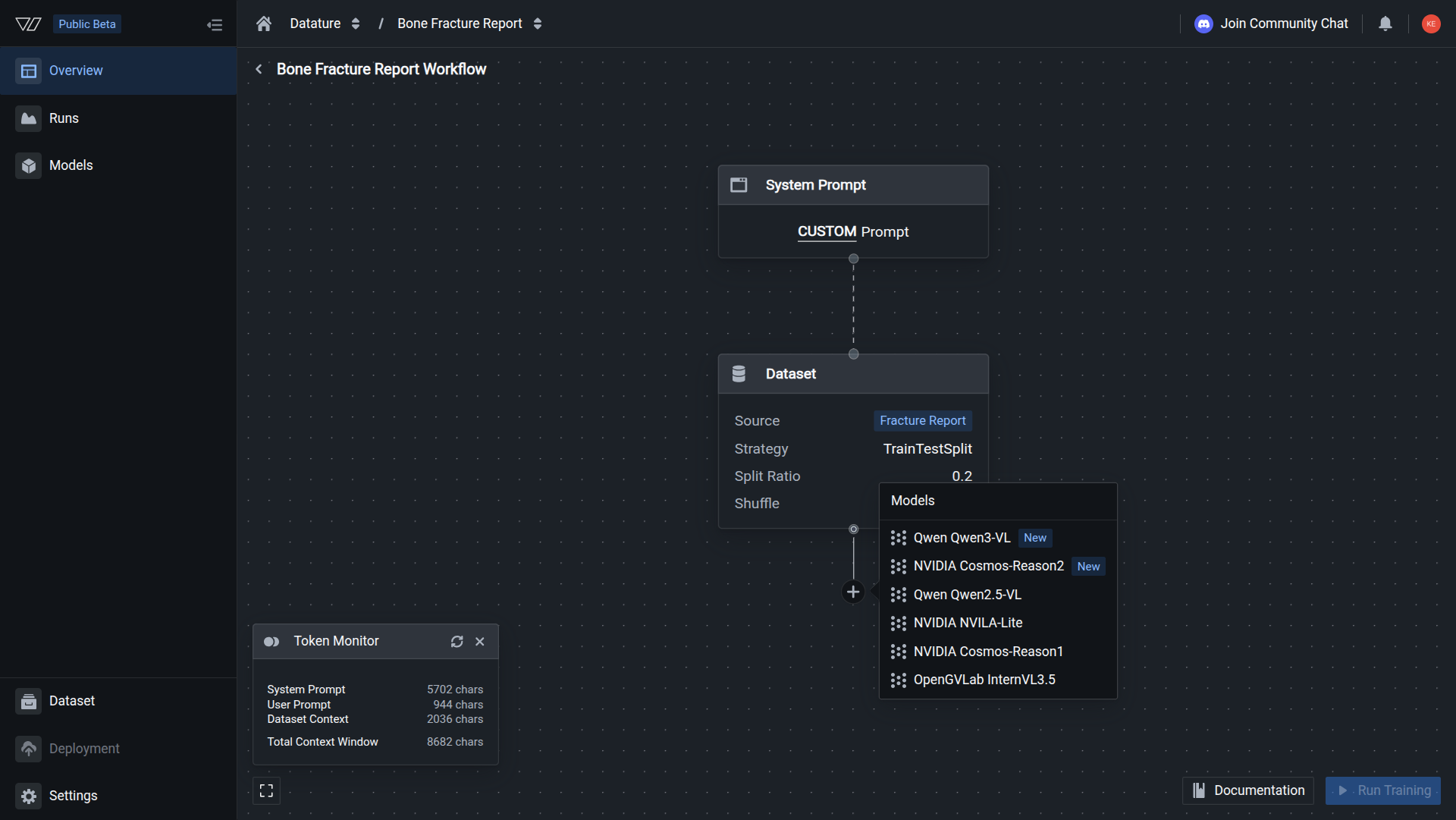
Choose from 4 state-of-the-art VLM architectures across different sizes (2B-32B parameters)
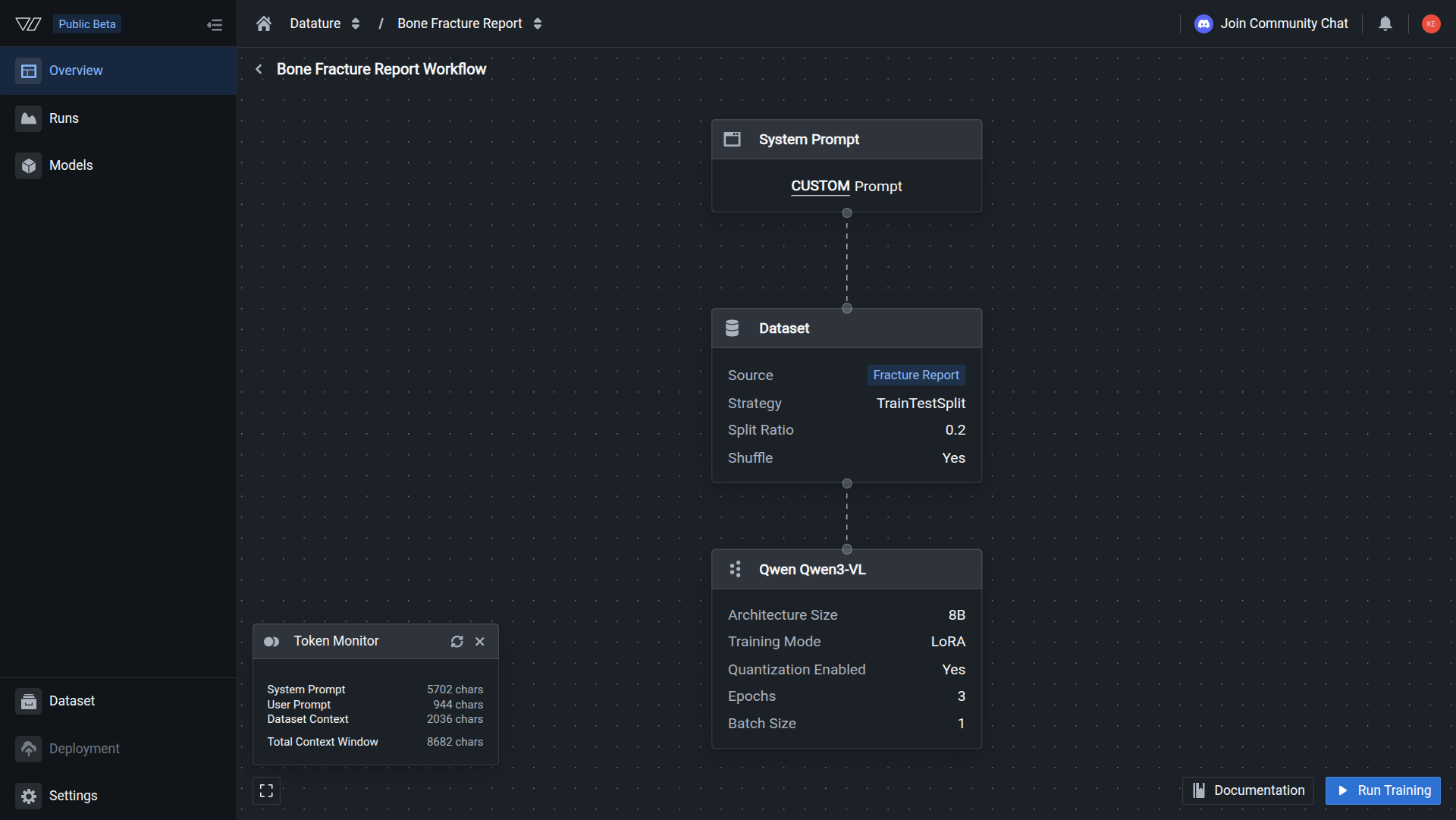
Configure training mode, hyperparameters, and inference behavior for optimal results
Step 1: Choose Your Model Architecture
Select the vision-language model that best fits your use case, accuracy requirements, and available compute resources.
Available Architectures
Vi supports four powerful VLM architectures, each optimized for different scenarios, with more coming soon:
| Model | Sizes Available | Best For | Key Strength |
|---|---|---|---|
| Qwen2.5-VL | 3B, 7B, 32B | General-purpose VLM tasks | Dynamic resolution, extended context (128K tokens) |
| NVIDIA NVILA-Lite | 2B | Resource-constrained deployments | Efficiency, fast inference |
| NVIDIA Cosmos-Reason1 | 7B | Complex reasoning tasks | Logical inference, multi-step analysis |
| OpenGVLab InternVL3.5 | 8B | Balanced performance | Fine-grained visual understanding |
| DeepSeek OCR (Coming Soon) | TBA | Document understanding and OCR | Specialized text extraction capabilities |
| LLaVA-NeXT (Coming Soon) | TBA | Advanced multimodal reasoning | Improved visual comprehension |
Recommended Starting PointQwen2.5-VL (7B) offers the best balance of performance and efficiency for most use cases. It handles diverse tasks including visual question answering, phrase grounding, and image understanding.
Quick Selection Guide
Choose based on your primary goal:
I need maximum accuracy
Recommended: Qwen2.5-VL 32B
The largest available model provides the highest accuracy across all task types. Requires substantial GPU resources (40-80GB) but delivers state-of-the-art results for:
- Production deployments with strict quality requirements
- Complex visual reasoning tasks
- Multi-image and video understanding
- Tasks requiring deep contextual understanding
I have limited compute resources
Recommended: NVILA-Lite 2B or Qwen2.5-VL 3B
These compact models run efficiently on single consumer GPUs (8-16GB) while maintaining good performance:
- NVILA-Lite: Optimized for efficiency, fastest inference
- Qwen2.5-VL 3B: Broader capabilities, general-purpose tasks
Both are ideal for edge deployments and real-time applications.
I need OCR or text extraction
Recommended: Qwen2.5-VL 7B or 32B
Qwen2.5-VL handles OCR tasks effectively along with other vision-language capabilities:
- Document understanding and processing
- Text extraction from images
- Multilingual text recognition
- General vision-language tasks
Coming Soon: DeepSeek OCR will be available for specialized OCR and document understanding tasks.
I need logical reasoning capabilities
Recommended: Cosmos-Reason1 7B
Optimized specifically for complex reasoning tasks:
- Multi-step logical inference
- Cause-and-effect analysis
- Visual reasoning puzzles
- Contextual understanding and decision-making
Best for analytical applications requiring deep reasoning over visual and textual information.
Explore all architectures in detail →
Step 2: Configure Model Settings
After selecting your architecture, fine-tune training and inference settings to optimize for your specific requirements.
Settings Categories
Model settings are organized into three main areas:
Model Options
Control the fundamental training approach:
- Architecture Size: Choose parameter count (2B-32B) to balance capacity and efficiency
- Training Mode: Select between full fine-tuning or LoRA for parameter-efficient training
- Quantization: Reduce memory usage with 4-bit or 8-bit quantization
- Precision Type: Trade speed for accuracy with different numeric precision levels
Impact: These settings determine memory requirements, training speed, and model capacity.
Hyperparameters
Control how the model learns during training:
- Epochs: Number of complete passes through your training data
- Learning Rate: Speed at which the model adapts to training data
- Batch Size: Number of training examples processed simultaneously
- Gradient Accumulation: Simulate larger batch sizes on limited hardware
- Optimizer: Algorithm that updates model weights during training
Impact: These settings affect training convergence, final model quality, and training stability.
Evaluation Settings
Control how the model generates predictions during inference:
- Max New Tokens: Maximum length of generated responses
- Top K Results: Limit candidate tokens for controlled generation
- Top P (Nucleus Sampling): Balance output diversity and quality
- Temperature: Control output randomness and creativity
- Repetition Penalty: Reduce repetitive text generation
Impact: These settings control output quality, diversity, and response length.
Default vs. Custom Settings
For most use cases, Vi's default settings provide a solid starting point:
| Setting Category | Default Behavior | When to Customize |
|---|---|---|
| Architecture Size | Recommended size for selected model | When optimizing for specific hardware or accuracy needs |
| Training Mode | Full fine-tuning | When memory is limited (use LoRA) |
| Hyperparameters | Balanced for convergence and speed | When training isn't converging or you need faster iterations |
| Evaluation | Moderate creativity, balanced length | When outputs are too short, too long, or too repetitive |
Start with DefaultsVi's default settings are tuned for most common use cases. Start with defaults and adjust only if you encounter specific issues like slow training, poor convergence, or suboptimal outputs.
View all settings and customization options →
Configuration Workflow
Follow this process when configuring your model:
- Select model architecture based on your task and resources
- Configure dataset with appropriate train-test split
- Define system prompt to guide model behavior
- Adjust model settings if needed (or use defaults)
- Create workflow to save your configuration
- Start training run to train your model
Configuration Tips
Experiment with multiple configurations
Create multiple workflows within your training project to test different configurations:
- Compare different model architectures on the same dataset
- Test various hyperparameter combinations
- Optimize for different deployment scenarios (cloud vs. edge)
Each workflow maintains its own configuration and training runs, making it easy to track and compare results.
Monitor resource usage
Keep track of your compute consumption as you experiment with different configurations:
- Larger models consume more compute credits
- Longer training (more epochs) increases costs
- Full fine-tuning uses more resources than LoRA
Balance accuracy requirements with available resources by testing smaller models first.
Iterate based on results
After your first training run completes:
- Evaluate model performance on test data
- Identify issues: Poor accuracy? Slow training? Repetitive outputs?
- Adjust settings: Change architecture, hyperparameters, or evaluation settings
- Create new workflow with updated configuration
- Compare results across multiple runs
Use the evaluation metrics to guide your configuration decisions.
Common Configuration Scenarios
Fast prototyping and experimentation
Goal: Quick iterations to validate your approach
Recommended Configuration:
- Architecture: Qwen2.5-VL 3B or NVILA-Lite 2B
- Training Mode: LoRA (faster, memory-efficient)
- Epochs: Start with 3-5 for quick validation
- Batch Size: Larger (8-16) for faster training
This configuration minimizes training time and cost while providing enough signal to validate your data quality and approach.
Production deployment with high accuracy
Goal: Maximum performance for production use
Recommended Configuration:
- Architecture: Qwen2.5-VL 32B or InternVL3.5 8B
- Training Mode: Full fine-tuning for maximum quality
- Epochs: 10-20 for thorough training
- Learning Rate: Conservative (1e-5 to 5e-5)
- Evaluation: Lower temperature (0.1-0.5) for consistent outputs
This configuration prioritizes accuracy and consistency for production-quality results.
Resource-constrained environments
Goal: Train effectively with limited GPU resources
Recommended Configuration:
- Architecture: NVILA-Lite 2B or Qwen2.5-VL 3B
- Training Mode: LoRA with 4-bit quantization
- Batch Size: Small (1-4) with gradient accumulation
- Precision: Mixed precision (BF16 or FP16)
This configuration enables training on consumer GPUs (8-16GB) while maintaining reasonable quality.
Creative or diverse outputs
Goal: Generate varied, creative responses
Recommended Configuration:
- Architecture: Qwen2.5-VL 7B or Cosmos-Reason1 7B
- Temperature: Higher (0.7-1.0) for more creativity
- Top P: Moderate (0.8-0.95) for diverse sampling
- Repetition Penalty: Moderate (1.1-1.3) to avoid repetition
This configuration encourages diverse, creative outputs while maintaining coherence.
Next Steps
Once you've configured your model:
Set up train-test splits and data processing
Define instructions for model behavior
Save your configuration as a reusable workflow
Launch a training run with your configuration
Common Questions
Can I change model settings after creating a workflow?
No, settings are fixed when you create a workflow. To try different settings, create a new workflow with the desired configuration.
You can maintain multiple workflows within a training project, each with different settings. This makes it easy to compare configurations and choose the best performing one.
What's the difference between model architecture and model settings?
Model Architecture (detailed guide) refers to the fundamental VLM design:
- Which base model (Qwen2.5-VL, NVILA-Lite, etc.)
- Model family and capabilities
- Available parameter sizes
Model Settings (detailed guide) refers to configuration options:
- How to train the model (training mode, hyperparameters)
- Memory optimizations (quantization, precision)
- Inference behavior (temperature, sampling parameters)
Think of architecture as "which car model" and settings as "how you tune and drive it."
Should I use full fine-tuning or LoRA?
Use Full Fine-Tuning when:
- Maximum accuracy is critical
- You have sufficient GPU resources (32GB+)
- Training time is not a constraint
- Deploying to production with quality requirements
Use LoRA when:
- GPU memory is limited (< 32GB)
- You need faster training iterations
- Experimenting with multiple configurations
- Training budget is constrained
Both can achieve excellent results. LoRA trades a small amount of potential accuracy for significant efficiency gains. Learn more about training modes.
How do I know if my settings are working?
Monitor these indicators during and after training:
During training (monitor runs):
- Loss should steadily decrease
- Training shouldn't stall or diverge
- Memory usage should be stable
After training (evaluate model):
- Test accuracy meets your requirements
- Outputs are relevant and coherent
- Generation length is appropriate
- No excessive repetition in responses
If results are poor, adjust settings and create a new workflow to test the changes.
What settings have the biggest impact on results?
In order of impact:
- Model Architecture & Size: Larger models generally perform better
- Training Data Quality: Good data matters more than settings
- Epochs: Too few = underfitting, too many = overfitting
- Learning Rate: Affects convergence speed and final quality
- Batch Size & Gradient Accumulation: Impacts training stability
- Evaluation Settings: Control output quality and diversity
Start by selecting the right model architecture, then focus on epochs and learning rate before fine-tuning other settings.
Can I use the same settings for different datasets?
Settings that typically transfer well:
- Model architecture (if tasks are similar)
- Training mode (LoRA vs. full fine-tuning)
- Evaluation settings (temperature, top P, etc.)
Settings that may need adjustment:
- Epochs: Depends on dataset size and complexity
- Learning Rate: May need tuning for different data distributions
- Batch Size: Might change based on dataset size
Create a new workflow for each dataset to track settings and results independently. You can start with settings that worked well on similar datasets and adjust as needed.
Related Resources
- Model Architectures Guide — Detailed comparison of all available VLMs
- Model Settings Reference — Complete documentation of all configuration options
- Configure Dataset — Set up data splits and processing
- System Prompts — Define model instructions
- Create Workflow — Save your configuration
- Evaluate Models — Assess model performance
- Resource Usage — Monitor compute consumption
- Quickstart Guide — Train your first model
Related resources
- Model architectures — Detailed guide to VLM architectures
- Model settings — Configure training parameters and hyperparameters
- Train a model — Complete training guide
- Create a workflow — Set up training workflows
- Configure training settings — Set checkpoint strategy and GPU
- Configure your dataset — Set train-test splits
- Configure your system prompt — Define model instructions
- Resource usage — Understand GPU costs and training time
- Evaluate a model — Assess model performance
- Quickstart — End-to-end training tutorial
- Manage runs — Monitor and manage training sessions
Need help?
We're here to support your VLMOps journey. Reach out through any of these channels:
Updated about 1 month ago