Download a Model

Download trained VLM models for deployment, testing, or offline inference.

Download trained VLM models to deploy them locally, integrate into production systems, or run offline inference. All model downloads happen through the Vi SDK, which provides built-in caching, error handling, and automatic retry for interrupted downloads.

💡

Part of deployment workflow

Train modelEvaluate modelDownload model (you are here) → Run inference


How to download models

All models are downloaded using the Vi SDK. You can either:

  • Generate code from web interface — Get ready-to-use code snippets (easiest for beginners)
  • Write code manually — Full control over download settings (for advanced users)

Both approaches use the same SDK underneath.


Download with Vi SDK

Install Vi SDK

If you haven't already installed the SDK with inference capabilities:

# Install with inference support
pip install vi-sdk[inference]

# Or install all features
pip install vi-sdk[all]

Complete installation guide →

Download a model

import vi

# Initialize client
client = vi.Client(
    secret_key="your-secret-key",
    organization_id="your-organization-id"
)

# Download the model
print("📥 Downloading model...")
downloaded = client.get_model(
    run_id="your-run-id",
    save_path="./models"
)

print(f"✓ Model downloaded successfully!")
print(f"   Model path: {downloaded.model_path}")
print(f"   Config path: {downloaded.run_config_path}")

Complete SDK guide → | SDK Models API →

Downloaded structure

models/
└── your-run-id/
    ├── model_full/          # Full model weights
    ├── adapter/             # Adapter weights (if available)
    └── run_config.json      # Training configuration

Load model for inference

After downloading, load the model for local inference:

from vi.inference import ViModel

# Load model for inference
print("🔄 Loading model...")
model = ViModel(
    run_id="your-run-id",
    secret_key="your-secret-key",
    organization_id="your-organization-id"
)

print("✓ Model loaded and ready for inference!")

# Run inference
result, error = model(
    source="path/to/image.jpg",
    user_prompt="Describe what you see in this image",
    stream=False
)

if error is None:
    print(f"Result: {result.caption}")

Complete inference guide →


Get code from web interface

The easiest way to get started is to have the Vi platform generate the download code for you. This gives you a ready-to-use code snippet with your credentials pre-filled.

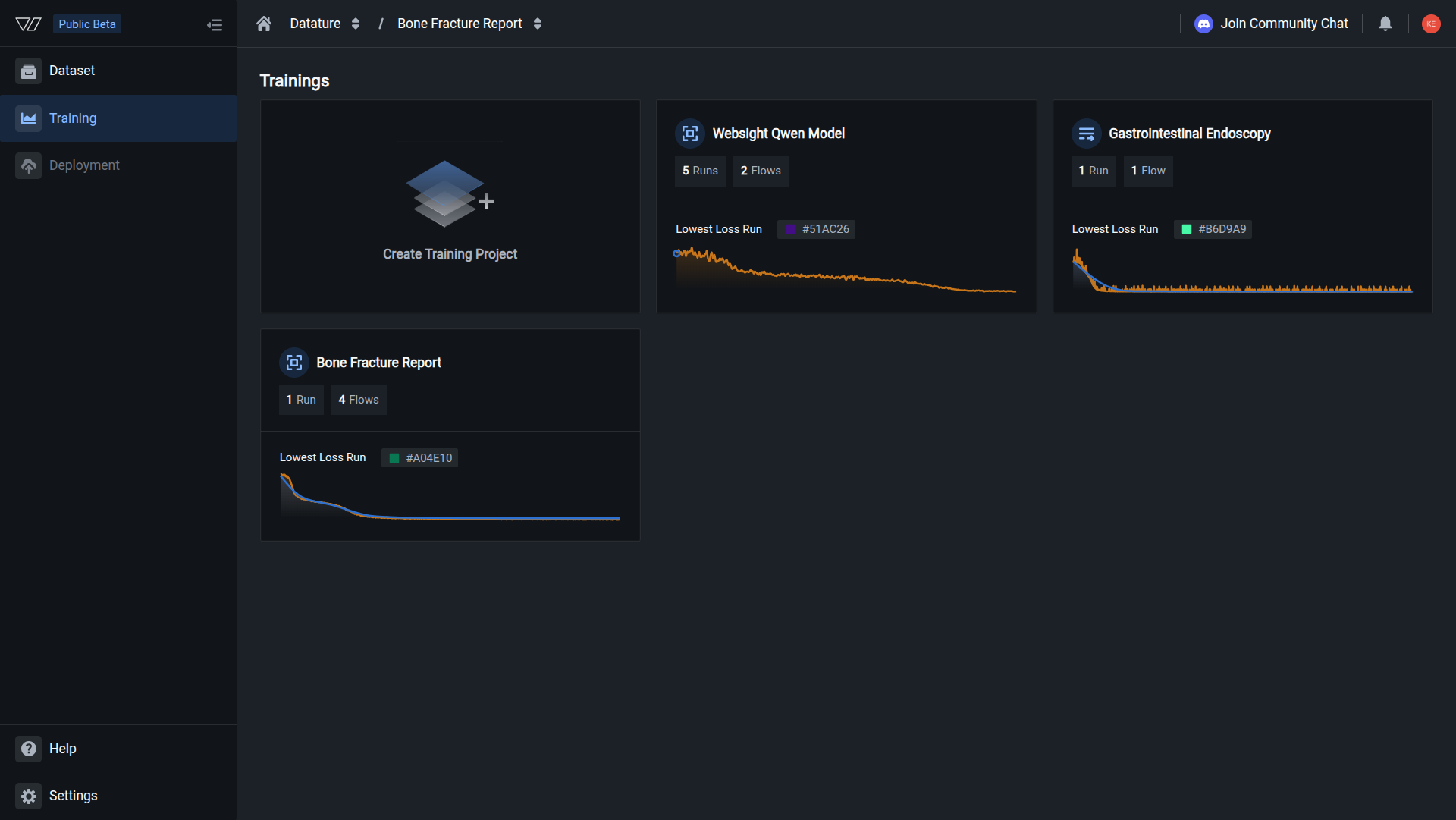
Step 1: Navigate to your model

  1. Go to your training project
  2. Click on the Models tab
  3. Find the trained model you want to download
💡

Finding your models

Models appear in the Models tab after a training run completes successfully. Each model shows its run session ID, training metrics, and epoch information.

Step 2: Open Export Model dialog

  1. Click the three-dot menu (⋮) next to your model
  2. Select Export Model from the dropdown menu

The menu includes these options:

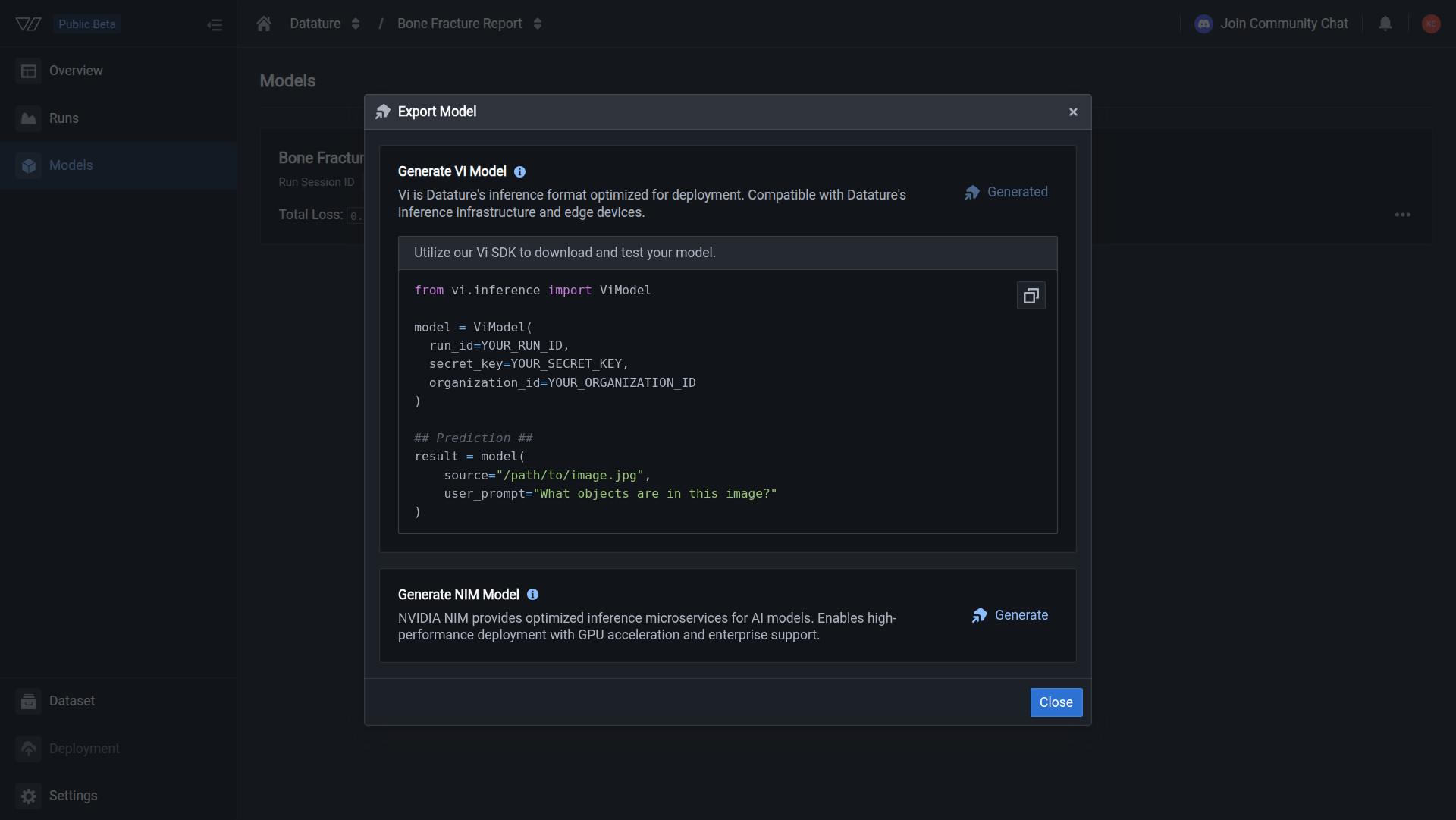
Step 3: Generate code snippet

In the Export Model dialog:

  1. Click the Generate button next to "Generate Vi Model"
  2. Wait for the code snippet to be generated (takes a few seconds)
📘

What gets generated?

The platform generates Python code using the Vi SDK that:

  • Downloads your model weights, adapters, and configurations
  • Loads the model for inference
  • Includes a sample inference call you can customize

Step 4: Copy and run the code

Once generated, the dialog displays ready-to-use Python code that uses the Vi SDK:

The generated code snippet includes:

from vi.inference import ViModel

model = ViModel(
    run_id=YOUR_RUN_ID,
    secret_key=YOUR_SECRET_KEY,
    organization_id=YOUR_ORGANIZATION_ID
)

## Prediction ##
result = model(
    source="/path/to/image.jpg",
    user_prompt="What objects are in this image?"
)

This code automatically downloads the model on first run, then caches it for subsequent uses.

Before running:

  • Replace YOUR_SECRET_KEY with your secret key
  • Replace YOUR_ORGANIZATION_ID with your organization ID
  • The run_id is pre-filled with your model's ID
  • Modify source to point to your image file
  • Customize user_prompt for your use case
Where do I find my secret key and organization ID?

Secret Key:

  1. Go to OrganizationSecret Keys
  2. Copy an existing key or create a new one
  3. Store it securely (it won't be shown again)

Organization ID:

  1. Go to OrganizationSettings
  2. Find your organization ID in the details section
  3. Copy it to use in your code

Learn more about authentication →

How do I store credentials securely?

Never hardcode credentials in your source code. Use environment variables instead:

Set environment variables:

export VI_SECRET_KEY="your-secret-key"
export VI_ORG_ID="your-organization-id"

Use in Python:

import os
from vi.inference import ViModel

model = ViModel(
    run_id="your-run-id",
    secret_key=os.getenv("VI_SECRET_KEY"),
    organization_id=os.getenv("VI_ORG_ID")
)

Security best practices →

Step 5: Run the code

  1. Copy the generated code to your Python script or Jupyter notebook
  2. Install Vi SDK if you haven't already: pip install vi-sdk[inference]
  3. Update credentials with your actual secret key and organization ID
  4. Run the code — The model downloads automatically on first use
  5. Test predictions on your images

Model downloads automatically

When you first create a ViModel instance, the SDK automatically:

  • Downloads model weights, adapters, and configurations
  • Caches them locally for fast subsequent loads
  • No need to manually download files!

Quick testing guide → | Complete inference API →


What gets downloaded?

Model weights

When you download a model, you get:

  • Full model weights — Complete model parameters for inference
  • Adapter weights — LoRA adapters if you trained with LoRA fine-tuning
  • Model configuration — Architecture specifications and parameter settings

Training configuration

The download includes your training setup:

Metadata

Additional information included:


Common use cases

Local development and testing

Download models to:

  • Test inference on local machines
  • Develop and debug integration workflows
  • Validate model performance before deployment
  • Experiment with different prompts and parameters

Example workflow:

from vi.inference import ViModel

# Load model locally
model = ViModel(
    run_id="your-run-id",
    secret_key="your-secret-key",
    organization_id="your-organization-id"
)

# Test on sample images
test_images = ["test1.jpg", "test2.jpg", "test3.jpg"]
results = model(source=test_images, user_prompt="Describe this image")

for img, (result, error) in zip(test_images, results):
    if error is None:
        print(f"{img}: {result.caption}")

Complete testing guide →

Production deployment

Export models for production systems:

  • Deploy on your own infrastructure
  • Integrate into existing ML pipelines
  • Run offline inference without internet
  • Reduce latency with local hosting

Example production setup:

import os
from vi.inference import ViModel

# Load with production settings
model = ViModel(
    run_id=os.getenv("MODEL_RUN_ID"),
    secret_key=os.getenv("VI_SECRET_KEY"),
    organization_id=os.getenv("VI_ORG_ID"),
    load_in_4bit=True  # Optimize memory usage
)

# Process images from your pipeline
def process_image(image_path: str):
    result, error = model(
        source=image_path,
        user_prompt="Identify defects in this product",
        stream=False
    )
    return result.caption if error is None else None

Production deployment guide →

Model backup and archiving

Download models to:

  • Create backup copies of trained models
  • Archive specific model versions for reproducibility
  • Share models with team members or collaborators
  • Transfer models between organizations

Backup workflow:

import vi
from datetime import datetime

client = vi.Client(
    secret_key="your-secret-key",
    organization_id="your-organization-id"
)

# Download and backup all production models
production_runs = ["run_abc123", "run_def456"]

for run_id in production_runs:
    backup_path = f"./backups/{run_id}_{datetime.now().strftime('%Y%m%d')}"
    client.get_model(run_id=run_id, save_path=backup_path)
    print(f"✓ Backed up {run_id}")

Model management guide →

Batch processing and automation

Download models for automated workflows:

  • Process large batches of images
  • Schedule inference jobs
  • Integrate with CI/CD pipelines
  • Automate quality control checks

Batch processing example:

from pathlib import Path
from vi.inference import ViModel

model = ViModel(
    run_id="your-run-id",
    secret_key="your-secret-key",
    organization_id="your-organization-id"
)

# Process entire directories
image_dir = Path("./incoming_images")
results = model(
    source=str(image_dir),
    user_prompt="Check for defects",
    recursive=True,
    show_progress=True
)

# Save results
for img_path, (result, error) in results:
    if error is None:
        print(f"✓ {img_path.name}: {result.caption}")

Batch inference guide →

Research and experimentation

Use downloaded models for:

  • Academic research and papers
  • Model behavior analysis
  • Custom fine-tuning experiments
  • Comparative studies between architectures

Research example:

from vi.inference import ViModel

# Compare multiple model versions
models = {
    "base": ViModel(run_id="run_base", ...),
    "fine_tuned": ViModel(run_id="run_finetuned", ...),
}

# Test on same images
test_image = "research/sample.jpg"

for name, model in models.items():
    result, _ = model(source=test_image, user_prompt="Describe", stream=False)
    print(f"{name}: {result.caption}")

Advanced download options

Caching behavior

The Vi SDK automatically caches downloaded models to avoid redundant downloads:

# First download - fetches from server
downloaded = client.get_model(
    run_id="your-run-id",
    save_path="./models"
)

# Subsequent loads - uses cached version
model = ViModel(run_id="your-run-id", ...)  # Fast, no download

Cache location: Models are cached in the save_path directory you specify (default: ~/.vi/models)

Clear cache: Simply delete the cached directory to force re-download

Manage model cache

View cached models:

from pathlib import Path

cache_dir = Path("./models")
for model_dir in cache_dir.iterdir():
    if model_dir.is_dir():
        print(f"Cached: {model_dir.name}")

Check cache size:

import shutil

cache_size = shutil.disk_usage("./models").used / (1024**3)
print(f"Cache size: {cache_size:.2f} GB")

Clear specific model:

import shutil

# Remove cached model
shutil.rmtree("./models/your-run-id")

Checkpoint selection

Download specific training checkpoints:

# Download latest checkpoint (default)
client.get_model(run_id="your-run-id")

# Download specific checkpoint
client.get_model(
    run_id="your-run-id",
    checkpoint="epoch_5"
)

# Download best performing checkpoint
client.get_model(
    run_id="your-run-id",
    checkpoint="best"
)

Learn about checkpoints →

Progress tracking

Monitor large model downloads with progress callbacks:

# Progress callback
def progress_callback(current, total):
    percent = (current / total) * 100
    print(f"Download progress: {percent:.1f}%")

# Download with progress tracking
client.get_model(
    run_id="your-run-id",
    save_path="./models",
    progress_callback=progress_callback
)

Memory optimization

For GPUs with limited memory, use quantization when loading:

# Load with 4-bit quantization (reduces memory by ~75%)
model = ViModel(
    run_id="your-run-id",
    secret_key="your-secret-key",
    organization_id="your-organization-id",
    load_in_4bit=True
)

# Or 8-bit quantization (reduces memory by ~50%)
model = ViModel(
    run_id="your-run-id",
    secret_key="your-secret-key",
    organization_id="your-organization-id",
    load_in_8bit=True
)

Complete optimization guide →


System requirements

Hardware requirements

Your system needs:

ComponentMinimumRecommended
CPUAny modern CPUMulti-core (4+ cores)
GPUOptionalNVIDIA GPU with CUDA
RAM8 GB16 GB+
Storage10 GB free50 GB+ for multiple models
InternetFor downloadingNot needed after download

GPU acceleration:

  • CPU inference works but is slower
  • NVIDIA GPU with CUDA highly recommended
  • Apple Silicon (M1/M2) supported via MPS backend

GPU setup guide →

Software requirements

SoftwareVersionNotes
Python3.10+Required for Vi SDK
PyTorch2.0+Installed with vi-sdk[inference]
TransformersLatestInstalled automatically
Vi SDKLatestpip install vi-sdk[inference]

Installation:

# Install all requirements
pip install vi-sdk[inference]

# Verify installation
python -c "import vi; print(vi.__version__)"

Complete installation guide →


Troubleshooting

Download fails or times out

Potential causes:

  • Large model size (multi-GB downloads)
  • Unstable network connection
  • Insufficient disk space
  • Server temporarily unavailable

Solutions:

  1. Check disk space:

    df -h  # Linux/Mac
    dir    # Windows
  2. Test internet connection:

    ping datature.io
  3. Retry download — Vi SDK automatically resumes interrupted downloads:

    # The SDK handles retries automatically
    downloaded = client.get_model(run_id="your-run-id")
  4. Use wired connection for large models (10+ GB)

  5. Download during off-peak hours for better speeds

If problems persist, contact support with your run ID and error message.

Cannot find run ID

To find your run ID:

Option 1: Via web interface

  1. Go to your training project
  2. Click the Runs tab
  3. Click on your completed run
  4. Copy the Run ID from the URL or run details panel

Option 2: Via SDK

import vi

client = vi.Client(
    secret_key="your-secret-key",
    organization_id="your-organization-id"
)

# List recent runs
print("Recent training runs:")
for run in client.runs:
    print(f"  - {run.name}")
    print(f"    Run ID: {run.run_id}")
    print(f"    Status: {run.status.phase}")
    print()

Learn about managing runs → | SDK Runs API →

Out of memory when loading model

Error message:

RuntimeError: CUDA out of memory

Solutions:

  1. Use quantization to reduce memory footprint:

    model = ViModel(
        run_id="your-run-id",
        secret_key="your-secret-key",
        organization_id="your-organization-id",
        load_in_4bit=True  # Reduces memory by ~75%
    )
  2. Close other applications to free RAM/VRAM

  3. Use CPU inference if GPU memory is insufficient:

    model = ViModel(
        run_id="your-run-id",
        secret_key="your-secret-key",
        organization_id="your-organization-id",
        device="cpu"  # Force CPU inference
    )
  4. Use model offloading for very large models:

    model = ViModel(
        run_id="your-run-id",
        secret_key="your-secret-key",
        organization_id="your-organization-id",
        device_map="auto"  # Automatically split across CPU/GPU
    )

Memory optimization guide →

Model loading is very slow

Causes and solutions:

First load (downloading):

  • Large models take time to download
  • Wait for download to complete (check progress)
  • Use faster internet connection

Subsequent loads (loading from disk):

  • Use SSD instead of HDD — 5-10x faster loading
  • Reduce model size with quantization
  • Keep models on local disk, not network drives

Speed up loading:

# Load with optimizations
model = ViModel(
    run_id="your-run-id",
    secret_key="your-secret-key",
    organization_id="your-organization-id",
    load_in_4bit=True,     # Faster loading
    use_flash_attention=True  # Faster inference
)
Invalid credentials error

Error message:

AuthenticationError: Invalid secret key or organization ID

Solutions:

  1. Verify credentials:

    • Check your secret key is correct
    • Ensure organization ID matches your account
    • Make sure secret key hasn't been deleted
  2. Create new secret key:

  3. Check permissions:

    • Ensure you have access to the training project
    • Verify you're a member of the organization

Authentication guide → | Manage secret keys →

Model file not found after download

Causes:

  • Download didn't complete successfully
  • Incorrect save path
  • File permissions issue

Solutions:

  1. Verify download completed:

    downloaded = client.get_model(
        run_id="your-run-id",
        save_path="./models"
    )
    print(f"Model path: {downloaded.model_path}")
    print(f"Config path: {downloaded.run_config_path}")
  2. Check file exists:

    from pathlib import Path
    
    model_path = Path("./models/your-run-id/model_full")
    print(f"Exists: {model_path.exists()}")
  3. Use absolute paths:

    from pathlib import Path
    
    save_path = Path.home() / "vi_models"
    downloaded = client.get_model(
        run_id="your-run-id",
        save_path=str(save_path)
    )
  4. Check permissions:

    ls -la ./models  # Linux/Mac
    dir /a ./models  # Windows

Best practices

Download after evaluation

Only download models that meet your requirements:

  1. Evaluate your model thoroughly first
  2. Check metrics meet your accuracy targets
  3. Review evaluation results and error cases
  4. Test on validation dataset before downloading

Evaluation checklist:

  • Training completed successfully
  • Metrics meet your requirements (mAP, precision, recall)
  • Loss curves show proper convergence
  • No signs of overfitting
  • Tested on validation images with good results

This saves time and storage by only downloading production-ready models.

Use version control

Track model versions for reproducibility:

# models_registry.json
{
  "production": {
    "run_id": "run_abc123",
    "deployed_date": "2025-01-05",
    "metrics": {"mAP": 0.89},
    "notes": "PCB defect detection v2.1"
  },
  "staging": {
    "run_id": "run_def456",
    "deployed_date": "2025-01-03",
    "metrics": {"mAP": 0.91},
    "notes": "Testing improved prompts"
  }
}

Benefits:

  • Know which model version is deployed where
  • Easy rollback if issues occur
  • Document model improvements over time
  • Share model information with team

Learn about workflows →

Test before production

Always validate downloaded models locally before deployment:

from vi.inference import ViModel
from pathlib import Path

# Load downloaded model
model = ViModel(
    run_id="your-run-id",
    secret_key="your-secret-key",
    organization_id="your-organization-id"
)

# Test on validation set
test_images = list(Path("./validation").glob("*.jpg"))
results = model(source=test_images, user_prompt="Check for defects")

# Validate results
success_count = sum(1 for _, error in results if error is None)
success_rate = (success_count / len(test_images)) * 100

print(f"Validation: {success_rate:.1f}% success rate")

# Only deploy if meets threshold
if success_rate >= 95:
    print("✓ Ready for production")
else:
    print("✗ Needs improvement")

Complete testing guide →

Backup important models

Create backups of production models:

import vi
import shutil
from datetime import datetime
from pathlib import Path

client = vi.Client(
    secret_key="your-secret-key",
    organization_id="your-organization-id"
)

# Backup production model
production_run = "run_abc123"
backup_dir = Path(f"./backups/{production_run}")

if not backup_dir.exists():
    print("Creating backup...")
    client.get_model(
        run_id=production_run,
        save_path=str(backup_dir)
    )

    # Add metadata
    metadata = {
        "run_id": production_run,
        "backup_date": datetime.now().isoformat(),
        "notes": "Production model backup before update"
    }

    import json
    with open(backup_dir / "backup_info.json", "w") as f:
        json.dump(metadata, f, indent=2)

    print(f"✓ Backup saved to {backup_dir}")

Storage recommendations:

  • Keep backups in separate location from working models
  • Store in cloud storage (S3, Google Cloud) for disaster recovery
  • Document model version and performance metrics
  • Regularly test restore process
Optimize storage

Manage model storage efficiently:

from pathlib import Path
import shutil

# Check storage usage
def get_model_size(run_id: str) -> float:
    """Get size of downloaded model in GB."""
    model_path = Path(f"./models/{run_id}")
    if model_path.exists():
        total_size = sum(
            f.stat().st_size
            for f in model_path.rglob('*')
            if f.is_file()
        )
        return total_size / (1024**3)
    return 0

# List all models
models_dir = Path("./models")
for model_dir in models_dir.iterdir():
    if model_dir.is_dir():
        size = get_model_size(model_dir.name)
        print(f"{model_dir.name}: {size:.2f} GB")

# Remove old models
def cleanup_old_models(keep_latest: int = 3):
    """Keep only the latest N models."""
    models = sorted(
        models_dir.iterdir(),
        key=lambda x: x.stat().st_mtime,
        reverse=True
    )

    for old_model in models[keep_latest:]:
        print(f"Removing old model: {old_model.name}")
        shutil.rmtree(old_model)

# cleanup_old_models(keep_latest=3)

Storage tips:

  • Use quantized models (4-bit/8-bit) to save space
  • Remove old development models
  • Keep only production and staging models
  • Store backups separately
Secure credential management

Never hardcode credentials:

Bad practice:

# ❌ DON'T DO THIS
model = ViModel(
    run_id="run_abc123",
    secret_key="sk_live_abc123...",  # Exposed in code!
    organization_id="org_123"
)

Good practice:

# ✅ Use environment variables
import os
from vi.inference import ViModel

model = ViModel(
    run_id=os.getenv("MODEL_RUN_ID"),
    secret_key=os.getenv("VI_SECRET_KEY"),
    organization_id=os.getenv("VI_ORG_ID")
)

Setup environment variables:

# Linux/Mac
export VI_SECRET_KEY="your-secret-key"
export VI_ORG_ID="your-organization-id"

# Or use .env file with python-dotenv
echo "VI_SECRET_KEY=your-secret-key" >> .env
echo "VI_ORG_ID=your-organization-id" >> .env

Using .env file:

from dotenv import load_dotenv
import os

load_dotenv()  # Load from .env file

secret_key = os.getenv("VI_SECRET_KEY")
org_id = os.getenv("VI_ORG_ID")

Security best practices →


Next steps

Now that you know how to download models, explore what you can do with them:


Related resources